The Confusion
If you ever lost your laptop charger and borrowed one from a friend, you probably noticed something:
HP and Dell chargers look exactly the same.
Same barrel connector. Same pin in the middle. They even fit perfectly into each other’s laptops.
So what’s the problem?
Same Shape — Different System
Here’s what most people don’t know:
That small pin in the center of the connector is not just part of the plug. It’s called the ID Pin — and it carries important information.
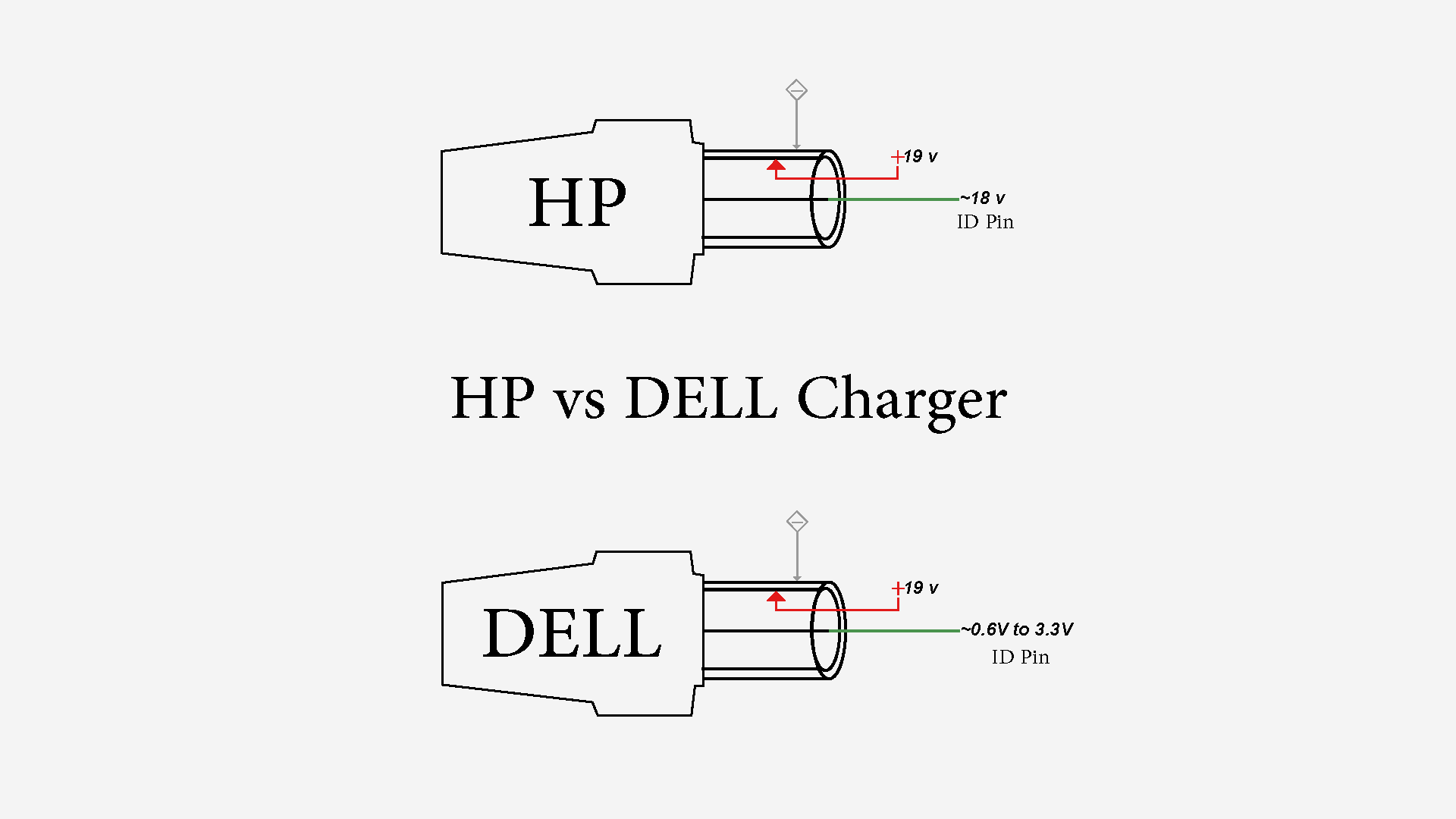
Both HP and Dell use this ID pin — but in completely different ways.
How HP Uses the ID Pin
HP uses the ID pin to send a signal to the laptop saying: “Hey, I’m an HP charger, here’s who I am.”
The voltage on that pin? ~18V to 19V
That’s almost the same as the main charging voltage.
How Dell Uses the ID Pin
Dell uses the ID pin differently. Dell laptops communicate with the charger through this pin — sending and receiving data to identify the charger model, wattage, and whether it’s genuine.
The voltage Dell expects on that pin? 0.6V to 3.3V maximum
That’s a tiny, low-voltage signal line. Almost like a data cable.
What Happens When You Mix Them?
HP Charger on a Dell Laptop
When you plug an HP charger into a Dell laptop:
- Main voltage: 19V → ✅ That’s fine, Dell expects that
- ID Pin voltage: ~18-19V → 💥 Dell expects max 3.3V
You just sent 19 volts into a pin designed for 3.3 volts.
The result? The ID pin circuit burns out. Your Dell laptop will:
- Stop charging properly
- Show “plugged in, not charging”
- In worse cases — damage the motherboard charging circuit
This is one of the most common mistakes I see in laptop repair. The charger fits. The laptop turns on. But slowly — the damage is done.
Dell Charger on an HP Laptop Safe but Useless
Flip the situation:
- HP laptop receives a Dell charger
- The ID pin voltage from Dell is low (0.6V - 3.3V)
- HP laptop reads it and says: “I don’t recognize this charger”
- Result: Laptop runs on power but won’t charge the battery
No damage. But no charging either.
💡 Quick Tip: Lost your HP charger? A Dell charger can keep your laptop running until you find the right one. Just don’t expect it to charge your battery — but it’ll get the job done for now.
Quick Reference Table
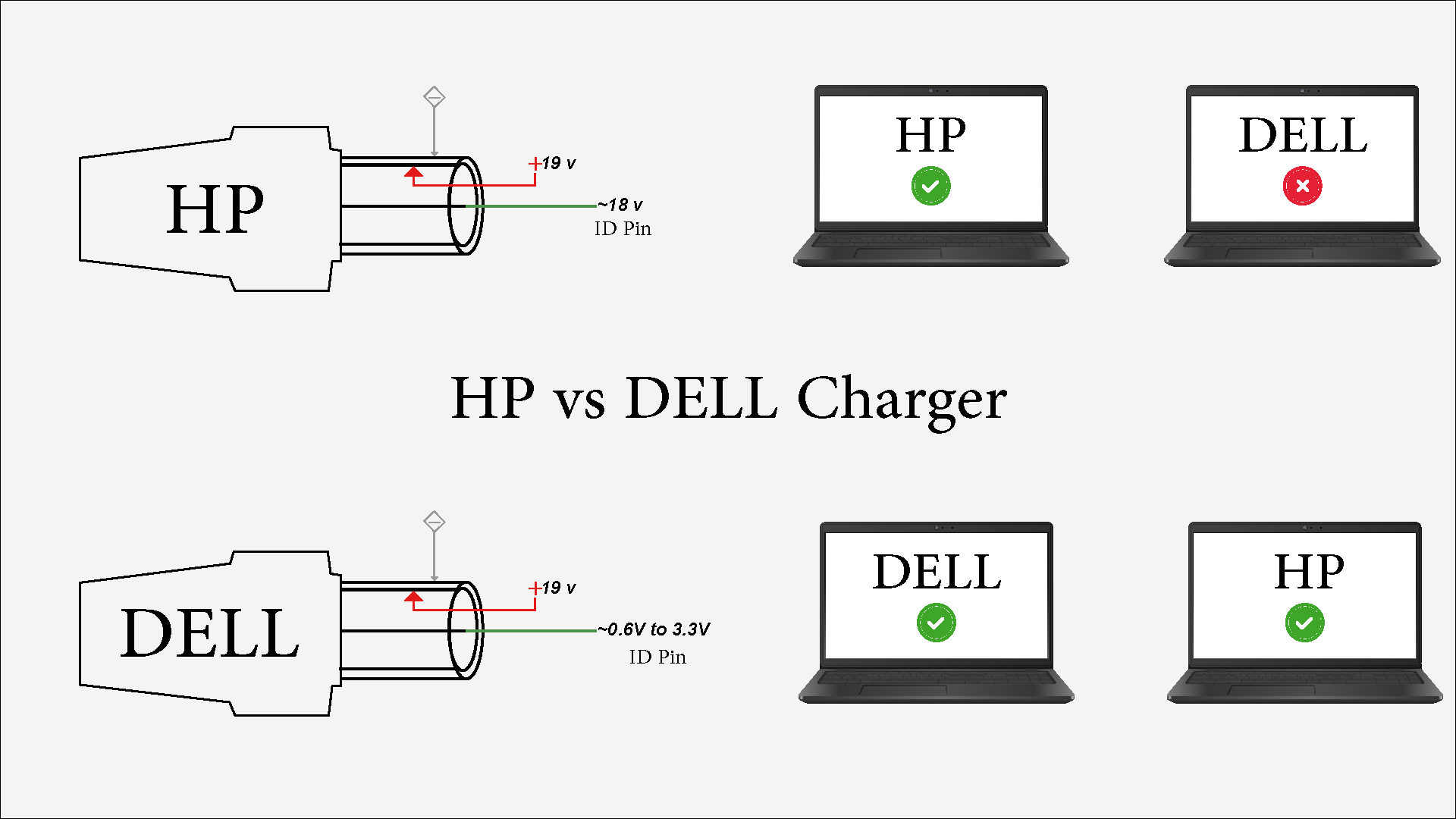
| Scenario | Result |
|---|---|
| HP Charger → HP Laptop | ✅ Works perfectly |
| Dell Charger → Dell Laptop | ✅ Works perfectly |
| HP Charger → Dell Laptop | ❌ Can damage ID pin circuit |
| Dell Charger → HP Laptop | Safe but won’t charge |
The Simple Rule to Remember
If you have a Dell laptop — never grab an HP charger, even if it fits. If you have an HP laptop — a Dell charger won’t hurt but won’t help either.
Always use the correct charger for your brand.
How to Tell Them Apart
Not sure which charger is which? Check the label on the charger brick:
- Look for the brand name
- Check the output voltage (both will show ~19V — that’s not enough to tell them apart)
- The safest way: look at the model number and match it to your laptop brand
No label? Grab a multimeter and check the ID pin voltage:
- ~18-19V on the ID pin → HP charger
- 0.6V to 3.3V on the ID pin → Dell charger
One More Thing
Dell laptops do have a built-in protection system that detects wrong chargers. But don’t count on it — protection circuits can fail, and not every Dell model has the same level of protection.
⚠️ The jar doesn’t survive every fall — just use the right charger.
Final Word
From a repair technician’s perspective — this mistake is more common than you think. And the sad part is that it’s completely avoidable.
Take care of your laptop — use the right charger. 🔌
💬 Discussion